How to Type in Punjabi
Instant Punjabi Message Builder
Type phonetically (e.g., ‘sat sri akal’) or use the One-Click buttons below to build your message.
Typing in Punjabi online lets you write Punjabi text directly in your web browser. You do not need to install any software or keyboard. It offers a quick and simple way to create Unicode Punjabi text. Students, professionals, writers, and anyone who communicates in Punjabi can use it on any device.
What Is Punjabi Typing Online?
Understanding Online Punjabi Typing
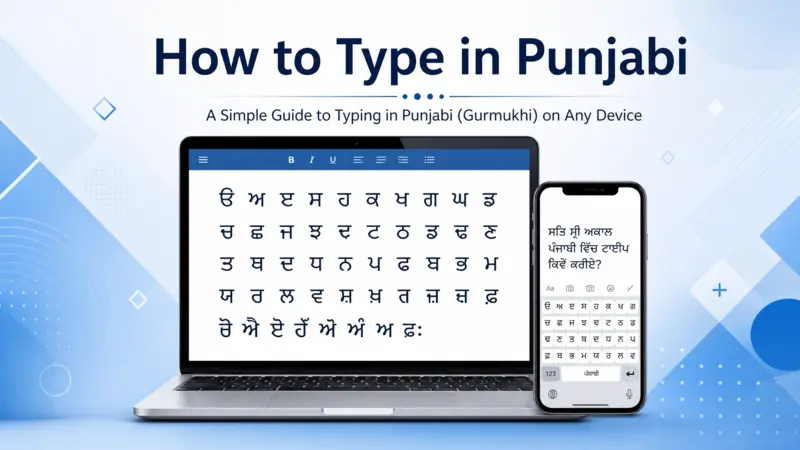
Punjabi typing online lets you write Punjabi text directly in your web browser. You do not need to install software or change your device settings. Most online tools support English to Punjabi typing through transliteration. They convert English letters into Punjabi script as you type. These tools generate Unicode text, which displays correctly across modern devices and websites. Most platforms also support the Gurmukhi script, the official writing system for Punjabi in India. Unicode ensures your text remains readable when you copy, share, or save it.
How Browser-Based Punjabi Typing Works
Browser-based Punjabi typing uses a web application to process your input instantly. You type English letters or select Punjabi characters from a virtual keyboard. The tool converts your input into Unicode Punjabi text in real time. This process uses transliteration or direct keyboard input, depending on your chosen method. Since everything runs in your browser, you do not need to download software or install an input method. You can start typing from almost any computer, tablet, or smartphone with internet access.
Ways to Type in Punjabi Online
English to Punjabi Transliteration
English to Punjabi transliteration offers the easiest way to type in Punjabi online. You type words with English letters, and the tool converts them into Punjabi automatically. This method uses phonetic typing, so you do not need to learn a new keyboard layout. It works well for users familiar with Romanized Punjabi and creates accurate Unicode text for everyday communication.
Virtual Punjabi Keyboard
A virtual Punjabi keyboard displays an on-screen keyboard inside your browser. You can click individual Punjabi characters to build words and sentences. This method uses direct script input instead of transliteration. It suits users who already know the Gurmukhi script and prefer typing with the standard Punjabi keyboard layout. No additional software or installation is required.
Unicode Punjabi Input
Unicode Punjabi input creates text that follows the Unicode Standard. This encoding keeps Punjabi text readable across different devices, operating systems, and applications. You can use the same content on Windows, macOS, Android, iPhone, and modern web browsers without formatting issues. Unicode also ensures your Punjabi text displays correctly in documents, emails, websites, and social media platforms.
Benefits of Typing Punjabi Online
Works on Any Device
Online Punjabi typing works on almost every modern device. You can access it from Windows, macOS, Linux, Android, or iPhone using a web browser. Your typed text stays consistent because Unicode supports these platforms. This flexibility lets you switch devices without changing your typing method or losing text compatibility.
No Installation Required
You can start typing without downloading software or installing keyboard packages. Open the web application in your browser and begin immediately. This approach saves time and works well on shared, public, or personal devices.
Unicode Compatibility
Unicode keeps Punjabi text readable across websites, documents, and applications. You can copy, paste, and share your content without character errors. It also preserves correct text rendering on different operating systems and browsers.
Fast and Convenient for Everyday Use
Online Punjabi typing makes daily communication simple. Write messages, emails, documents, and social media posts with ease. It also helps create articles, notes, and other digital content. Since everything works in your browser, you can type whenever you need.
How to Save and Copy Punjabi Text
Copy Punjabi Text
After typing, you can copy your Punjabi text with a single click. The copied text goes to your device’s clipboard. You can then paste it into another application or website. Unicode keeps the text consistent, making copy-and-paste reliable across different devices and operating systems.
Save Your Punjabi Content
You can save your Punjabi text for future use in several formats. Store it as a text file, document, or personal note. This makes it easy to edit, organize, and access later. Saving your work also helps you avoid retyping important content.
Use Your Text Anywhere
You can use your Punjabi text across many digital platforms. Paste it into websites, messaging apps, Google Docs, or Microsoft Word. Unicode preserves the correct characters, so your content remains readable and properly formatted wherever you share or publish it.
Where You Can Use Punjabi Online Typing
Personal Communication
Punjabi online typing makes everyday communication easier. Write messages in your native language and share them instantly. Use your text in emails, chat platforms, and popular messaging apps. Unicode keeps every character accurate, so recipients see your message exactly as you wrote it on any compatible device.
Education and Work
Online Punjabi typing helps students and professionals create clear digital content. Prepare assignments, class notes, office documents, and presentations with ease. Since Unicode works across modern platforms, your Punjabi text stays consistent when you edit, print, or share your files with others.
Digital Publishing
Punjabi online typing also supports digital publishing. Create blog posts, website content, and social media updates in Punjabi without extra software. You can also write articles, announcements, and other online content. Unicode ensures your text displays correctly across browsers, content management systems, and supported publishing platforms.
Frequently Asked Questions About ( How to Type in Punjabi )
Can I Type Punjabi Without Installing Software?
Yes. Most online Punjabi typing tools work directly in your web browser. You do not need to install software or additional keyboard packages. Open the typing tool, start typing, and create Unicode Punjabi text from almost any internet-connected device.
Can I Use Punjabi Typing on Mobile?
Yes. You can type Punjabi on Android phones, iPhones, and tablets through a compatible web browser. Most online typing tools adjust to different screen sizes, making it easy to write Punjabi text whether you use a mobile device or a desktop computer.
Does Online Punjabi Typing Support Unicode?
Most modern Punjabi typing tools support Unicode. Unicode creates a standard text format that works across operating systems, browsers, and applications. This keeps your Punjabi text readable and correctly displayed when you save, copy, or share your content.
Can I Copy Punjabi Text Anywhere?
Yes. You can copy your Punjabi text and paste it into documents, emails, websites, messaging apps, and social media platforms. Unicode preserves the correct characters, so your content remains consistent across supported applications and devices.
Is Online Punjabi Typing Free?
Many online Punjabi typing tools offer free access for everyday use. You can type, copy, and save Punjabi text without creating an account or downloading software. Some platforms also include extra features, but basic online Punjabi typing remains free on many trusted websites.
Conclusion
Typing in Punjabi online offers a simple and reliable way to create Unicode Punjabi text. You can use it directly in your browser without installing software. Copy, save, and share your content across devices with ease. Start typing online today and communicate in Punjabi wherever you need.