Punjabi Typing
Phonetic Punjabi Typing Tool
English to Punjabi Transliteration
📖 Phonetic Typing Guide
Punjabi Typing helps you write Punjabi quickly and accurately on digital devices. This guide explains what Punjabi Typing is, its common methods, basic requirements, beginner mistakes, and practical tips to help you start with confidence.
What is Punjabi Typing?
Definition of Punjabi Typing
Punjabi Typing means writing the Punjabi language on digital devices such as computers, laptops, tablets, and smartphones. You can enter text using different input methods based on your needs and experience. Unlike handwriting, digital typing creates editable text that you can save, search, copy, and share instantly. Modern Punjabi Typing mainly uses Unicode, the global standard for text encoding. Unicode keeps Punjabi text readable across websites, apps, and operating systems without changing its characters. This standard ensures consistent display and supports reliable digital communication.
Where Punjabi Typing Is Used
People use Punjabi Typing in many everyday and professional tasks. Students prepare assignments, notes, and research documents. Professionals write emails, reports, and business letters. Many users send messages through chat applications and publish content on social media platforms. Website owners create Punjabi web pages to reach local audiences. Schools, colleges, and organizations also use Punjabi Typing for educational materials, announcements, and official communication. Digital Punjabi content helps people communicate clearly while preserving their preferred language in both personal and professional environments.
Why Punjabi Typing Matters Today
Punjabi Typing plays an important role in today’s digital world. It allows people to communicate in their native language without language barriers. Unicode support makes Punjabi text compatible with most modern devices and software. Organizations, educators, and content creators can share information that remains accurate across different platforms. As more people use regional languages online, Punjabi digital content continues to grow. The Unicode Standard provides a consistent foundation for multilingual text, making Punjabi Typing reliable for long-term digital use.
Different Methods of Punjabi Typing
English to Punjabi (Phonetic) Typing
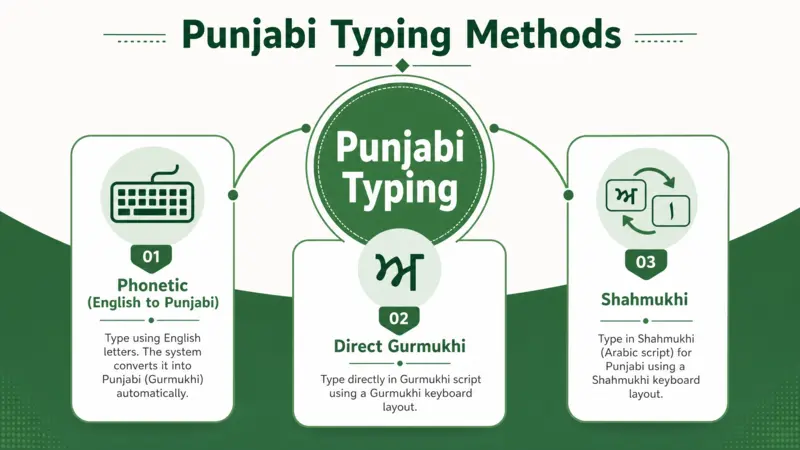
English to Punjabi Typing is the easiest method for beginners. You type Punjabi words with English letters. The typing tool automatically converts Roman Punjabi into the Punjabi script. This process is called transliteration. It changes the script but keeps the pronunciation similar. You do not need to memorize a keyboard layout. Most online Punjabi typing tools use this method because it is simple and fast. It works well for everyday tasks like writing messages, emails, and short documents. Google Input Tools and similar applications have made phonetic typing popular among new users.
Direct Gurmukhi Keyboard Typing
Direct Gurmukhi keyboard typing lets you enter characters from the native Punjabi script. Each key represents a specific Punjabi character. This method requires basic knowledge of the Gurmukhi keyboard. Many professionals, publishers, and government offices prefer it for regular work. It gives precise control over text entry and supports accurate document creation. Users who type Punjabi frequently often choose this method for its consistency and reliability.
Shahmukhi Typing
Shahmukhi Typing uses the Urdu-based script for writing Punjabi. It is widely used in Pakistan and by many Punjabi-speaking communities. Users type Punjabi with Shahmukhi characters instead of Gurmukhi. Modern typing tools support digital Shahmukhi text for websites, documents, and online communication. This method helps preserve regional writing traditions while making digital content easier to create and share.
Unicode-Based Punjabi Typing
Unicode-based Punjabi Typing stores text using the Unicode Standard, the world’s accepted character encoding system. Unicode keeps Punjabi text consistent across devices, browsers, and operating systems. Your content remains readable without changing fonts or formatting. Major technology companies, including Microsoft, Google, and Apple, support Unicode across their platforms. Unicode also improves compatibility with websites, documents, search engines, and modern applications. It remains the recommended standard for creating reliable Punjabi digital content.
Requirements for Punjabi Typing
Device Requirements
You can use Punjabi Typing on almost any modern device. A desktop or laptop offers a comfortable typing experience for long documents. Smartphones and tablets work well for quick messages, emails, and social media posts. Choose a device with a responsive keyboard and updated software. Most modern devices already support Punjabi text when you enable the required language settings.
Software and Browser Requirements
Punjabi Typing works with most popular web browsers and operating systems. Google Chrome, Microsoft Edge, Mozilla Firefox, and Safari support modern web-based typing tools. Windows, Android, iOS, and macOS also provide language support for Punjabi input. Many online typing tools run directly in your browser. You do not need to install extra software for basic typing tasks.
Punjabi Input Support
Proper Punjabi input support ensures accurate and readable text. Use Unicode fonts because they follow the global standard for digital text. Enable the Punjabi language in your device settings before typing. Your selected input method should also work with your keyboard and operating system. Good compatibility keeps your text consistent across websites, applications, and documents.
Internet vs Offline Typing
Online Punjabi Typing tools work through a web browser and require an internet connection. They offer quick access without installation. Offline typing software runs directly on your device after installation. It continues working even without internet access. Both options support Punjabi Typing effectively. Choose the one that matches your workflow, internet availability, and daily typing needs.
Common Mistakes While Doing Punjabi Typing
Mixing Unicode and Non-Unicode Text
Many users combine Unicode and non-Unicode text in one document. This mistake causes display problems and broken characters. Always use Unicode for new content. The Unicode Standard keeps Punjabi text readable across modern devices, websites, and applications.
Choosing the Wrong Typing Method
Some beginners select a typing method that does not match their needs. This choice creates confusion and slows their work. Start with phonetic typing if you use English letters. Choose direct script typing only after learning the required keyboard.
Incorrect Character Selection
Selecting the wrong Punjabi characters changes the meaning of words. Small typing errors can confuse readers and reduce clarity. Review your text before sharing or saving it. Most modern Punjabi typing tools also suggest corrections that help improve accuracy and consistency.
Ignoring Device or Language Settings
Incorrect language settings often prevent Punjabi text from displaying correctly. Enable Punjabi language support before you start typing. Keep your keyboard, operating system, and input method compatible with each other. Proper settings create a smooth typing experience and reduce avoidable errors.
Beginner Tips for Punjabi Typing
Start with the Right Typing Method
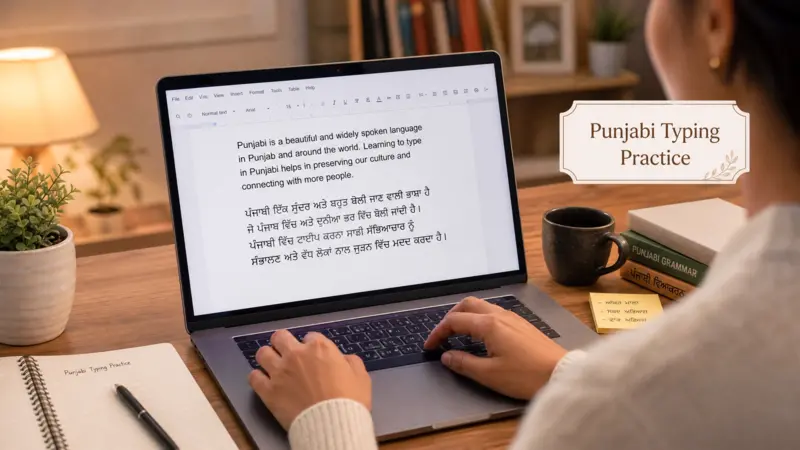
Choose a typing method that matches your experience. Beginners usually find English to Punjabi phonetic typing easier and more comfortable.
Focus on Accuracy First
Type carefully instead of rushing. Accurate typing builds confidence and reduces mistakes from the beginning.
Use Unicode Whenever Possible
Always create Punjabi text in Unicode. It ensures better compatibility across devices, websites, and applications.
Practice Short Sentences Consistently
Begin with short Punjabi sentences each day. Regular practice improves familiarity and helps you type naturally over time.
Conclusion
Punjabi Typing makes digital communication simple. Choose the method that suits your needs and start writing Punjabi with confidence today.