Online Punjabi Keyboard
Punjabi Keyboard lets you type in the Punjabi language using Gurmukhi or Shahmukhi script. It works directly in your web browser, so you can start typing without installing software. Students, professionals, and everyday users can create Punjabi text quickly and accurately. Use it on Android phones, iPhones, Windows PCs, Macs, tablets, and Chromebooks to write messages, emails, documents, and social media posts with ease.
A Punjabi Keyboard helps you type in the Punjabi language quickly and accurately. It works as a virtual keyboard that lets you write Punjabi text without a physical Punjabi keyboard. You can use it for messages, emails, documents, social media posts, and everyday communication. This online keyboard supports both Gurmukhi keyboard and Shahmukhi keyboard layouts. You can choose the script that matches your writing needs. The keyboard uses the Unicode Standard, which keeps your text readable across websites, apps, and devices. Unicode also helps preserve the correct Punjabi characters when you copy, paste, or share your content.
Whether you need Punjabi typing for school, work, or personal use, this tool offers a simple way to start. It also supports English to Punjabi typing, making it easier for beginners to enter Punjabi text with familiar English letters. You can use this Punjabi input tool directly in your browser without installing extra software. The keyboard works smoothly on Android phones, iPhones, Windows PCs, Macs, tablets, and Chromebooks. This broad compatibility lets you type Punjabi whenever and wherever you need it.
What is Punjabi Keyboard?
A Punjabi Keyboard is a virtual tool that lets you type in the Punjabi language using your computer, tablet, or smartphone. It works as an input method that converts your keystrokes into Punjabi characters. You can use it to write messages, emails, notes, documents, and social media posts without changing your physical keyboard. An online Punjabi Keyboard runs directly in your web browser. You do not need to install software or download an app to start typing. Simply open the keyboard, choose your preferred script, and begin writing. This makes online typing fast, simple, and accessible from almost any device.
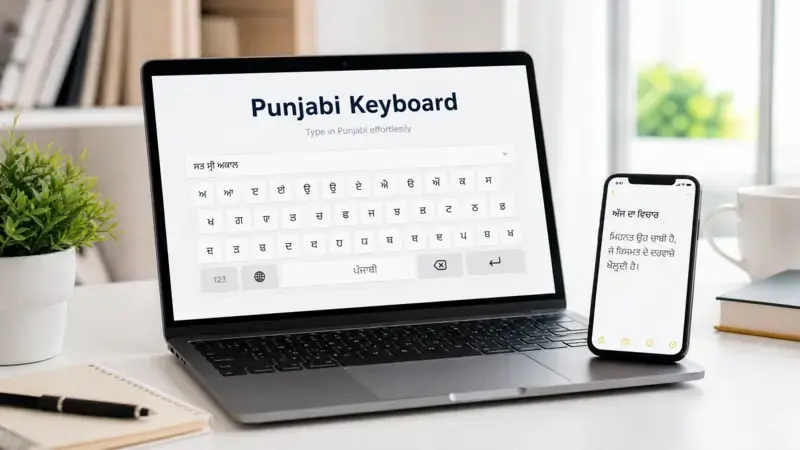
The keyboard supports the Unicode Standard. Unicode assigns a unique code to every Punjabi character. This ensures your text displays correctly across websites, apps, and operating systems. It also keeps your content readable when you copy, paste, or share it with others. Unlike a hardware keyboard, an online Punjabi Keyboard does not replace your physical keys. Instead, it provides a digital typing interface on your screen. You use your existing keyboard or touchscreen to enter Punjabi text. This approach offers greater flexibility and works well on both mobile and desktop devices.
Most Punjabi Keyboards support two writing systems. Gurmukhi is the official script used mainly in Indian Punjab. Shahmukhi is widely used in Pakistani Punjab. This page provides a general overview of both scripts. You can explore each one in more detail through our dedicated guides on Punjabi Typing, Gurmukhi Keyboard, and Shahmukhi Keyboard.
Key Features of Punjabi Keyboard
Easy Punjabi Typing
Punjabi Keyboard makes Punjabi typing simple for beginners and experienced users. Its clear layout helps find characters. You can write messages, documents, emails, and social media posts easily. The tool supports smooth language input, so you spend less time searching for letters and more writing.
Unicode Compatible
The keyboard follows the Unicode Standard to produce accurate Punjabi text. Unicode keeps your content readable across websites, apps, and operating systems. Your text stays intact when you copy, paste, or share it. This standard also improves compatibility with modern software and online platforms.
Works on All Devices
You can use Punjabi Keyboard on almost any modern device. It works smoothly on a smartphone, tablet, laptop, desktop computer, and Chromebook. The browser-based design gives you the same experience across different screen sizes. This flexibility lets you type Punjabi whenever you need it.
English to Punjabi Input
The keyboard supports English to Punjabi input for users more comfortable with English letters. As you type, the tool converts your input into Punjabi text. This approach helps new learners start writing without memorizing every Punjabi character. It offers a simple way to communicate in Punjabi.
Fast and Responsive
Punjabi Keyboard responds quickly to every keystroke. The lightweight design reduces delays and creates a smooth typing experience. A clean interface keeps your attention on writing instead of navigating complex menus. Faster text input also improves productivity during daily tasks.
Supports Copy and Paste
You can copy your Punjabi text with a single click and paste it anywhere. The Unicode format keeps your content readable in documents, websites, emails, and messaging apps. This feature saves valuable time and makes sharing simple across different platforms and devices effortlessly.
No Download Required
The online Punjabi Keyboard works directly in your browser. You can start typing without downloading software or installing extra files. Open the tool, begin writing, and access your Punjabi text instantly. This approach also saves storage space on your device.
Mobile Friendly Interface
The interface adapts well to different screen sizes and touch controls. Whether you use a smartphone, tablet, or desktop, the digital keyboard remains easy to navigate. Clear buttons and a responsive layout create a comfortable typing experience for everyday use at home, school, or work.
Online Punjabi Keyboard Tool
The online Punjabi Keyboard lets you type Punjabi text directly in your web browser. It works as a browser-based typing tool, so you can start writing in seconds. You do not need special hardware or extra software. Open the tool, select your preferred script, and begin typing immediately. The keyboard captures your text input and converts it into accurate Punjabi characters. It uses the Unicode Standard to produce text that displays correctly across modern websites, apps, and operating systems. Unicode also helps keep your content consistent when you copy, paste, or share it with others.
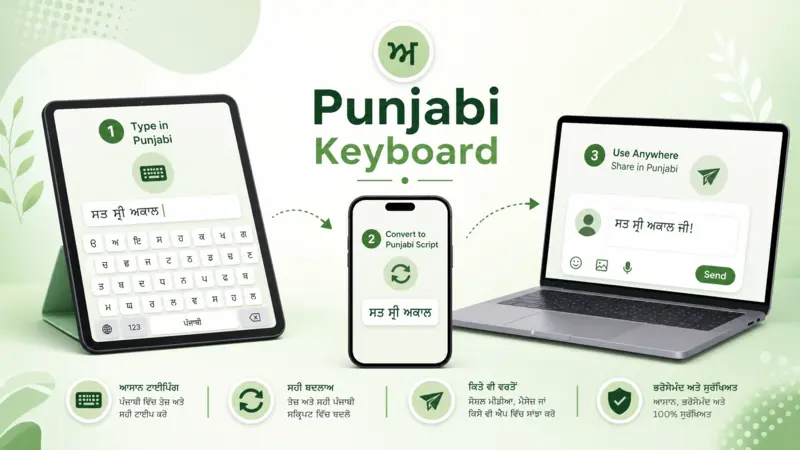
You can use the online Punjabi Keyboard for many everyday tasks. Write school assignments, office documents, personal notes, blog posts, or emails with confidence. The generated text works well with popular productivity tools such as Google Docs and common email services like Gmail. This makes it easy to continue your work without formatting issues. The keyboard also supports communication across social media and messaging platforms. You can create Punjabi posts for Facebook and Instagram or send messages through WhatsApp and Telegram. Since the output uses Unicode, your recipients can read the text on compatible devices without extra fonts or plugins.
The browser-based design makes the tool accessible from almost anywhere with an internet connection. Whether you use a desktop computer, laptop, tablet, or smartphone, you can open the keyboard and start typing within moments. The simple interface helps you focus on writing instead of setup. If you want to explore more advanced typing methods, layouts, and input options, visit our dedicated Punjabi Typing Tool guide for a complete walkthrough and additional resources.
How to Use Punjabi Keyboard
Using a Punjabi Keyboard is simple. You can start writing in just a few steps. The online tool works in your browser and requires very little setup. Follow the steps below to begin typing Punjabi quickly and easily.
Open the Keyboard
Open the online Punjabi Keyboard in your web browser. The tool loads within seconds on most devices. You can access it from a smartphone, tablet, laptop, or desktop computer. Once the page opens, the keyboard is ready to use immediately without installation, registration, downloads, or setup requirements.
Choose Your Script
Select the Punjabi script that matches your needs. Most Punjabi Keyboards support Gurmukhi and Shahmukhi. Choose the script before you begin typing. This ensures your text appears in the correct writing system. If you are unsure which script to use, you can learn more in our dedicated guides.
Start Typing
Click inside the text area and begin writing. Enter your text using the on-screen keyboard or your physical keyboard, depending on the tool. The keyboard generates Unicode Punjabi text that works across modern devices and applications. You can continue typing until your content is complete.
Copy Your Text
After you finish writing, copy the generated Punjabi text with the provided copy option or your device’s standard copy command. Unicode keeps the text readable and helps preserve the correct characters when you move your content to another application without formatting issues across different platforms and devices.
Paste Anywhere
Paste your Punjabi text into documents, emails, messaging apps, or social media platforms. The text works with popular services such as Google Docs, Gmail, WhatsApp, Facebook, Instagram, and Telegram. This makes sharing your content quick, simple, fast, convenient, efficient, and effortless.
If you want to learn advanced typing techniques or improve your typing speed, explore our Punjabi Typing Tutorial. For language preferences and configuration options, visit our Punjabi Keyboard Settings guide.
Punjabi Keyboard on Different Devices
You can use a Punjabi Keyboard on almost every modern device. The online tool works in your browser and delivers a consistent typing experience across different platforms. Whether you use a phone, tablet, or computer, you can write Punjabi with ease.
Android
Android users can access the online Punjabi Keyboard from any modern browser. The tool works on phones and tablets without changing your device setup. If you prefer an app, explore options on Google Play. Learn more in our Punjabi Keyboard for Android guide.
iPhone and iPad
The online keyboard works smoothly on both iPhone and iPad. Open the tool in your preferred browser and start typing Punjabi in minutes. If you want an app-based solution, you can browse compatible keyboards on the App Store. Read our Punjabi Keyboard for iPhone guide.
Windows PC
Windows users can type Punjabi directly from their browser without a physical Punjabi keyboard. The Unicode output works with documents, websites, and communication platforms. You can also find typing solutions for Windows. Visit our Punjabi Keyboard for Windows guide.
macOS
Mac users can access the online Punjabi Keyboard through popular browsers such as Safari, Chrome, or Firefox. The tool creates Unicode text that works with documents, emails, notes, and web applications. This provides a simple way to write Punjabi across everyday tasks.
Chromebook
Chromebooks support the online Punjabi Keyboard through the Chrome browser. The lightweight design loads quickly and performs well on ChromeOS devices. You can create Punjabi text for assignments, emails, forms, and social media without switching devices or extra software.
No matter which device you choose, the online Punjabi Keyboard offers a simple and reliable way to write Punjabi whenever you need it.
Punjabi Scripts Supported
Punjabi is written in two major scripts. Both represent the same language but serve different regions and writing traditions. A modern Punjabi Keyboard supports these scripts to help users type accurately and communicate with their intended audience. The online keyboard generates Unicode text, which keeps your content readable across websites, apps, and devices.
Gurmukhi Script
Gurmukhi is the official script of Punjab in India and the most widely used script for Punjabi education, literature, and government communication. A Gurmukhi Keyboard helps users create accurate Unicode text for documents, messages, websites, and social media. Learn more in our dedicated Gurmukhi Keyboard guide.
Shahmukhi Script
Shahmukhi is widely used in Punjab, Pakistan. It uses a modified Perso-Arabic writing system to represent Punjabi. A Shahmukhi Keyboard allows users to write clear and readable Punjabi text for personal, educational, and professional communication. Explore our detailed Shahmukhi Keyboard guide to learn more.
Both scripts support Unicode, which helps preserve the correct characters when you copy, paste, or share your text. Unicode also improves compatibility with modern browsers, operating systems, and popular applications. The right script depends on your audience and writing preference, not on the language itself.
Why Use an Online Punjabi Keyboard?
An online Punjabi Keyboard offers a simple way to write Punjabi whenever you need it. You can open the tool in your browser and start typing within seconds. There is no need to install software or configure complex settings. This makes it a practical choice for both occasional and regular users. The keyboard works across modern browsers and supports smartphones, tablets, laptops, desktops, and Chromebooks. Whether you are at home, in school, or at work, you can access the same tool from almost any device with an internet connection.
Students can use the keyboard for assignments, notes, and research. Professionals can create emails, reports, and business documents in Punjabi. It also helps users write posts, comments, and captions for social media or send messages through their favorite communication apps. Because the keyboard produces Unicode text, your content remains readable on compatible websites and applications. You can easily copy your text and use it wherever you need it.
This page provides a general overview of why people choose an online Punjabi Keyboard. If you want a detailed explanation of its practical advantages, explore our dedicated Benefits of Punjabi Keyboard article.
Frequently Asked Questions
What is a Punjabi Keyboard?
A Punjabi Keyboard is a digital typing tool that helps you write in the Punjabi language. It supports Punjabi characters through Gurmukhi and Shahmukhi scripts. You can use it to create messages, documents, emails, and social media posts on different devices.
Is the Punjabi Keyboard free to use?
Yes. Most online Punjabi Keyboards are free to use. You can open the tool in your browser and start typing without paying a subscription. Some keyboard apps may offer extra features, but basic Punjabi typing is usually available at no cost.
Does it work on Android devices?
Yes. You can use an online Punjabi Keyboard on Android phones and tablets through a modern web browser. It also works with many Android keyboard apps available on Google Play, giving you multiple ways to type Punjabi.
Does it support iPhone and iPad?
Yes. The online Punjabi Keyboard works on both iPhone and iPad through supported browsers. You can also find Punjabi keyboard apps on the App Store if you prefer a dedicated mobile keyboard for everyday typing.
Can I use the Punjabi Keyboard online?
Yes. An online Punjabi Keyboard runs directly in your browser. You do not need special hardware to start typing. Simply open the tool, choose your preferred script, and begin writing Punjabi from almost any internet-connected device.
Does the keyboard support Unicode?
Yes. The keyboard generates Unicode Punjabi text. Unicode helps your content display correctly across websites, documents, operating systems, and messaging apps. It also preserves the correct characters when you copy, paste, or share your writing.
Can I copy and paste Punjabi text?
Yes. After typing, you can copy your Punjabi text and paste it into documents, emails, websites, and messaging apps. Unicode formatting helps keep the text accurate and readable across compatible platforms.
Does it support Gurmukhi and Shahmukhi?
Yes. Many Punjabi Keyboards support both Gurmukhi and Shahmukhi. You can select the script that matches your audience or writing preference. Support may vary depending on the keyboard or application you choose.
Do I need to install anything?
No. An online Punjabi Keyboard works without installation. You can access it through your browser and start typing immediately. If you want offline access or extra features, you can choose a dedicated keyboard app instead.
Explore More Punjabi Keyboard Guides
This page introduces the essentials of Punjabi Keyboard, but there is much more to explore. Our detailed guides cover specific topics to help you improve your Punjabi typing experience and solve common problems.
Learn the basics with Punjabi Typing, Punjabi Typing Online, and How to Type in Punjabi. Explore Punjabi Keyboard Layout, Punjabi Keyboard Shortcuts, Punjabi Keyboard Settings, and Punjabi Keyboard Features to understand the tool better. If you face issues, visit Punjabi Keyboard Not Working for practical solutions.
You can also discover Punjabi Keyboard Symbols, Punjabi Keyboard Special Characters, Punjabi Keyboard Tips, Punjabi Keyboard Benefits, Punjabi Keyboard Uses, Punjabi Keyboard FAQ, and Punjabi Keyboard History. Build your skills with Punjabi Typing Practice, Punjabi Typing Test, and Punjabi Typing Speed.
For advanced tools, explore Punjabi Voice Typing, Punjabi Speech to Text, Punjabi Text to Speech, Best Punjabi Keyboard Apps, Gurmukhi Keyboard, Shahmukhi Keyboard, Punjabi Character Map, Punjabi Copy and Paste, Punjabi Font Converter, Punjabi Fonts, Punjabi Unicode Converter, and Punjabi Unicode.