Punjabi Keyboard Layout
Visual Punjabi Keyboard Map
Click or hover over any key to see the Punjabi character mapping. This helps you learn the InScript layout used for Unicode Punjabi typing.
A Punjabi keyboard layout shows where each Gurmukhi character appears on a keyboard. It helps you type Punjabi accurately using the Unicode standard. This guide suits beginners, students, professionals, and anyone who wants to understand the Punjabi keyboard layout.
What Is a Punjabi Keyboard Layout?
Definition of a Punjabi Keyboard Layout
A Punjabi keyboard layout defines the position of every Gurmukhi character on a keyboard. It acts as a map that helps users find letters, vowel signs, and other symbols while typing. The Punjabi language and the keyboard layout are not the same. Punjabi is the language, while the keyboard layout is the arrangement of keys used to enter that language on a computer or mobile device.
Why Keyboard Layout Matters
A clear keyboard layout makes Punjabi typing easier and more accurate. It helps beginners learn key positions with confidence and improve their typing speed over time. Most modern layouts also support Unicode, which keeps Punjabi text readable across websites, documents, and devices. The Unicode Consortium maintains this global standard for consistent digital text representation.
Where It Is Commonly Used
People use Punjabi keyboard layouts on Windows, macOS, Linux, Android, and iPhone devices. They also work in web applications, word processors, email services, messaging apps, and online forms. A Unicode-based layout ensures your Punjabi text displays correctly across supported platforms and software.
Overview of the Punjabi Script
Gurmukhi Script Overview
Gurmukhi is the official script for writing the Punjabi language in India. It uses a well-organized writing system with unique characters for clear communication. The script includes consonants, vowels, and vowel signs that work together to form words. Each character has a fixed Unicode code point, which keeps Punjabi text consistent across digital platforms. Unicode also allows the same text to display correctly on different devices, applications, and modern fonts.
Basic Structure of Punjabi Characters
Punjabi writing begins with independent vowels, which can stand alone. Dependent vowel signs, also called matras, attach to consonants to change their sounds. Special marks such as Bindi and Tippi represent nasal sounds in many words. Addak shows that the following consonant receives extra stress. Halant appears in limited cases to suppress the inherent vowel, while Nukta creates additional sounds for borrowed words. Together, these elements form the foundation of accurate Gurmukhi writing and digital typing.
Punjabi Keyboard Layout Explained
How the Keyboard Is Organized
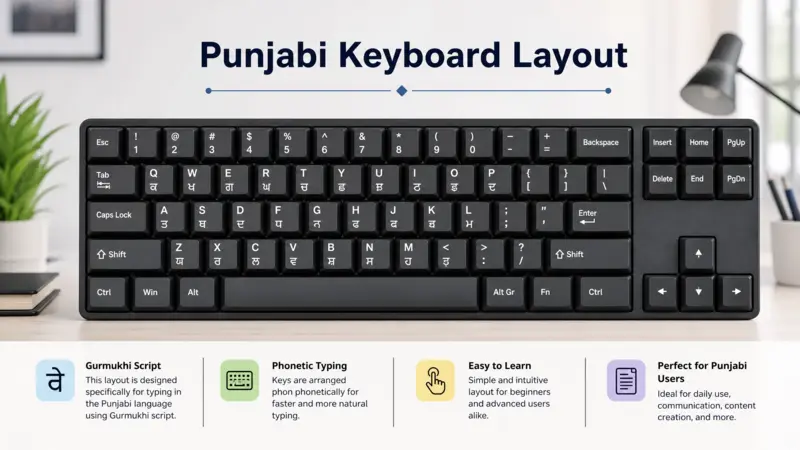
Most Punjabi keyboard layouts use the familiar QWERTY keyboard as their foundation. English letters remain in place, while Punjabi characters appear on assigned keys. This approach helps users learn the layout faster. Frequently used Gurmukhi letters occupy easy-to-reach positions for efficient typing. Vowel signs and special marks sit near related consonants to improve accuracy. The layout follows a logical arrangement instead of random placement. Once you understand the key groups, finding characters becomes much easier. This organized design reduces typing errors and supports a smoother learning experience across physical and virtual keyboards.
Common Punjabi Keyboard Layout Standards
Several Punjabi keyboard layout standards exist to meet different typing needs. InScript is India’s standard keyboard layout for Indian languages. It follows a uniform key arrangement across multiple scripts. InScript 2 improves this design with better support for modern Unicode typing. Phonetic layouts place Punjabi characters based on similar English sounds, making them easier for beginners. Transliteration layouts convert English letter sequences into Gurmukhi text as you type. Some organizations also use custom standard layouts for specific workflows. Although these layouts differ, they all aim to produce accurate Punjabi text using a consistent character mapping.
Unicode and Modern Punjabi Typing
Modern Punjabi typing depends on the Unicode Standard for reliable text encoding. The Unicode Consortium assigns a unique code point to every Gurmukhi character. Formats such as UTF-8 store and exchange this text across different systems. Unicode also ensures compatibility with modern fonts like Raavi, Noto Sans Gurmukhi, and Noto Serif Gurmukhi. As a result, Punjabi text displays correctly in documents, websites, and applications without changing the original character encoding.
Punjabi Keyboard Layout Diagram
Understanding the Keyboard Diagram
A Punjabi keyboard layout diagram provides a visual map of every key. It helps you identify the location of Gurmukhi characters before you start typing. Most diagrams follow the standard QWERTY keyboard with Punjabi characters placed on matching keys. The keys appear in familiar rows, making navigation simple. Letter groups follow a logical pattern instead of random placement. Vowel signs and other symbols appear close to related characters for easier recognition. A clear diagram also helps you understand how the entire keyboard is organized at a glance.
Reading Key Positions Correctly
Start by observing the left-hand and right-hand sections of the keyboard. Many commonly used consonants occupy easy-to-reach positions to improve typing efficiency. Vowels and matras appear on nearby keys to support natural word formation. Special marks such as Bindi, Tippi, and Addak also have dedicated positions. Every key follows a predefined key mapping, which links a specific key to a specific Gurmukhi character. This mapping stays consistent within the selected keyboard layout. Once you understand these key positions, reading any Punjabi keyboard diagram becomes much easier. You can quickly locate characters and build confidence before practicing Punjabi typing.
Punjabi Keyboard Key Positions
Placement of Letters
Punjabi keyboard layouts place consonants and vowels in a structured pattern for easy access. Frequently used letters usually appear on comfortable key positions to support faster typing. Related characters often stay close to each other, making the layout easier to remember. Independent vowels have dedicated keys, while consonants form the main letter groups. This organized arrangement reduces confusion and helps users locate characters without searching across the keyboard.
Placement of Special Characters
Special characters play an important role in accurate Punjabi writing. Matras modify the sound of consonants and appear on assigned keys near related letters. Bindi and Tippi represent nasal sounds in different words. Addak marks the doubling of the following consonant, while Nukta creates extra sounds for borrowed words. Each symbol has a fixed position within the selected keyboard layout, making character input consistent and predictable.
Layout Consistency Across Devices
Most modern Punjabi keyboard layouts keep similar key positions across desktop computers, laptops, and mobile virtual keyboards. The screen size may change, but the basic character arrangement remains familiar. This consistency helps users switch between devices without relearning the layout. It also supports a smoother typing experience in documents, web applications, and everyday digital communication.
Understanding Different Punjabi Keyboard Variations
Unicode vs Traditional Layouts
Unicode Punjabi keyboard layouts follow a global character encoding standard. They display text consistently across websites, documents, and devices. Traditional layouts may rely on legacy fonts or custom encoding, which can cause display and compatibility issues. Most modern applications support Unicode for reliable Punjabi typing and content sharing.
Physical vs Virtual Keyboards
A physical keyboard uses actual keys on a desktop or laptop. A virtual keyboard appears on a touchscreen or within a web application. Both use the same Punjabi keyboard layout, but the typing experience differs. Physical keyboards offer faster input, while virtual keyboards provide greater convenience on smartphones and tablets.
Frequently Asked Questions
What is a Punjabi keyboard layout?
It shows where Gurmukhi characters appear on a keyboard.
Is Gurmukhi the standard Punjabi keyboard?
Gurmukhi is the standard script for Punjabi in India.
Is Unicode used?
Yes, modern Punjabi keyboards use Unicode.
Are all Punjabi keyboards the same?
No. Layouts vary, but they share the same writing system.
Conclusion
Understanding the Punjabi keyboard layout makes learning Punjabi typing much easier. Start by recognizing the Gurmukhi key arrangement before practicing. A Unicode-based layout ensures accurate, readable text across modern devices, helping you type confidently and communicate effectively in Punjabi.